Papercute Inline: A Playful Font for Modern Design
Discovering a font that blends whimsy with professional versatility can transform a design project from ordinary to unforgettable. Papercute Inline, a charming layered typeface born in Paris, offers exactly this unique combination, providing designers with a powerful tool for creative expression and effective communication.
Understanding Papercute Inline's Unique Appeal
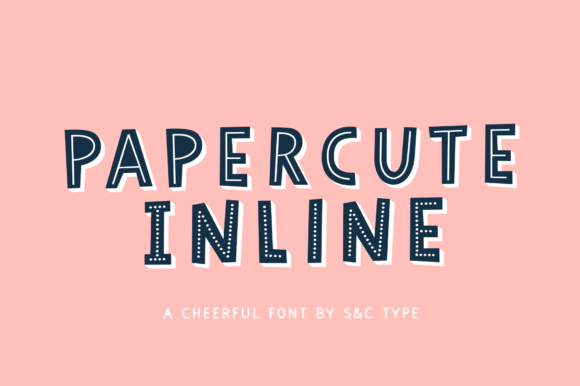
Designed by Fanny Coulez and Julien Saurin, Papercute Inline is a hand-drawn font family inspired by the art of paper cutting. Its core strength lies in its eight distinct styles—including 3D, outline, full line, and dotted line variants. These styles are not just separate fonts; they are designed to be superimposed, allowing for incredible depth and customization. Using compatible software like Adobe Photoshop or Illustrator, designers can layer these styles and assign a different color to each, creating vibrant, multi-dimensional typography that feels both crafted and contemporary.
This approach to typography moves beyond simple letterforms. It becomes a central element of the visual design, contributing to a project's overall aesthetic and emotional impact. The font's inherent cuteness and readability make it exceptionally versatile across various applications.
Practical Applications for Creative Projects
The layered nature of Papercute Inline makes it a valuable asset for a wide range of design needs. Its playful yet clear personality can enhance branding, digital content, and print materials alike.
- Brand Identity & Logo Design: Create a distinctive and memorable logo that stands out in a crowded market. The layered effect allows for unique color combinations that can become a core part of a brand's visual identity, especially for brands targeting a younger demographic or those in creative, lifestyle, or artisanal industries.
- Marketing & Social Media Graphics: Capture attention instantly on platforms like Instagram, Pinterest, and TikTok. Use Papercute Inline for headlines, quotes, or promotional graphics to add personality and increase engagement. Its visual interest encourages users to pause their scrolling.
- Packaging & Editorial Design: On product packaging, this font can convey a sense of handmade quality and fun, making items more appealing on the shelf. In editorial layouts for magazines or blogs, it serves as a striking headline font that draws readers into the content.
- Web & UI Design Elements: While best used for display text, Papercute Inline can enhance website hero sections, call-to-action buttons, or feature titles, injecting creativity into the user experience. Its playful nature can soften a corporate interface or highlight special features.
- Advertising & Presentations: Make advertising campaigns and business presentations more dynamic and memorable. A well-designed slide deck using this font can communicate ideas with greater clarity and visual appeal, improving audience retention.
Tips for Effective Implementation
Integrating a distinctive font like Papercute Inline requires thoughtful consideration to maintain design integrity and effectiveness.
Consistency is Key: Establish clear rules for how and where the font will be used within a project or brand system. Define which styles are primary and which are accent, and stick to a consistent color palette when layering to avoid visual chaos.
Prioritize Readability: Always test the font at the intended size and in the intended context. Ensure that the layered effect does not compromise legibility, especially for critical information. Its strength is in headlines and short bursts of text, not lengthy paragraphs.
Consider the Audience: The font's playful, hand-drawn style resonates strongly with specific audiences. Evaluate whether this aesthetic aligns with your target demographic's expectations and the project's overall goals. It excels in contexts where approachability and creativity are valued.
Maintain Visual Hierarchy: Use Papercute Inline strategically to create focus. Pair it with a clean, neutral sans-serif or serif font for body text to ensure a balanced and professional layout. This contrast helps establish a clear visual hierarchy, guiding the viewer's eye through the design.
Selecting the right creative assets is a fundamental part of a designer's workflow. A resource like Papercute Inline offers more than just letters; it provides a framework for building unique visual stories. By understanding its capabilities and applying it with purpose, designers can elevate their work, strengthen brand communication, and create designs that truly resonate with their audience. Thoughtful typography choices are an investment in both aesthetics and effective communication.